Makeup Frenzy Themes: Round Guide and Grayscale Tips
Master Makeup Frenzy themes with grayscale makeup ideas, blending tips, and a clear round strategy. Build a complete look before adding finishing touches.
Jump to
How Do Makeup Frenzy Themes Work?
A gorgeous smoky eye can still miss the brief if its colors clash with the round. Makeup Frenzy themes set the direction for your look, so read the prompt before picking your makeup. Build around Makeup Frenzy themes from the start, and you can spend the remaining time refining a complete design.
In Makeup Frenzy on Roblox, you create makeup looks, style your character, compete in themed rounds, and vote for your favorite entries. You also earn rewards through play. The theme gives that creative process a shared direction: everyone tackles the same brief with their own interpretation.
A grayscale round is one example. Its brief calls for black, white, and gray, giving you room to experiment with dramatic eyes, pale highlights, and dark lips while keeping the palette consistent.
The challenge is making those limited colors feel intentional. Black contour, white concealer, and gray eyeshadow can create dimension, but they need different placement and careful blending. Putting the darkest shade everywhere leaves less room for your eyeliner, brows, and lips to stand out.
For Makeup Frenzy themes with a restricted palette, decide where you want the strongest contrast before applying makeup. Choose a focal point, then build the rest of the face around it.
| Part of the look | Grayscale direction | Detail to focus on |
|---|---|---|
| Base | White for a fully grayscale design | Cover visible areas evenly |
| Contour | Black blended into softer gray | Keep cheek and nose definition readable |
| Eyes | Black shadow with gray inner corners | Separate the shadow from the eyeliner |
| Lips | Gray fill with black liner | Blend the border into the center |
| Accents | White gloss, glitter, or a white star | Place highlights deliberately |
Use this palette as a design plan. You can create a gothic interpretation or a softer smoky look with the same colors; the difference comes from how much contrast you use.
Build a Black, White, and Gray Look Step by Step
Grayscale Makeup Frenzy themes reward careful attention to the brief during player voting. Keep the color restriction visible throughout your design, including small details that are easy to overlook while zoomed in.
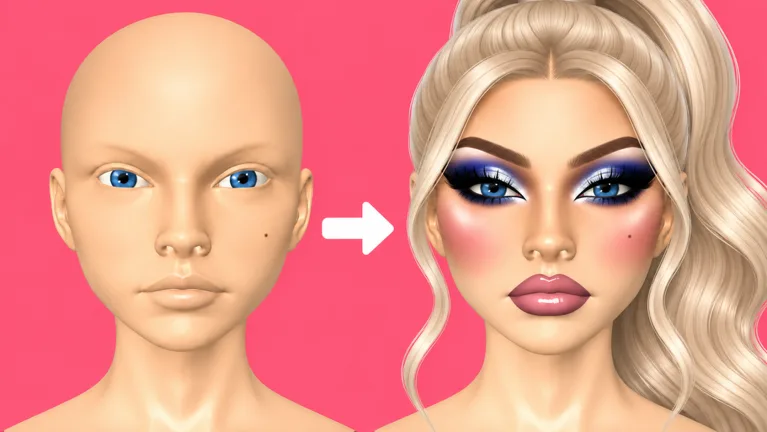 Image: Roblox / ciao kombucha fanclub
Start with the broad shapes of the face. Leave tiny decorations until your eyes, brows, and lips are finished.
Establish the base and contour
For an all-over grayscale design, apply a white base and check the sides of the head, the back, and beneath the chin. Those areas deserve attention when you rotate the face during application.
Add black contour around the cheeks, then blend it until the edges soften. Keep checking the overall face instead of working on one cheek for too long. Strong contour can suit a dramatic design, but leave enough lighter space for the rest of the makeup.
For the nose, zoom in and reduce your brush size. Apply narrow contour marks, then blend carefully. Add white concealer beneath the eyes, on the forehead, and on the chin to bring lighter areas back into the design.
Shape the eyes and brows
Apply black eyeshadow, then add gray toward the inner corners. Blend the transition without spreading the darkest shade across the entire eye area.
Reduce your brush size for eyeliner. Draw the wing, connect it to the rest of the line, and zoom out to check its shape against the other eye. Keep the wing manageable if the round is moving quickly.
Brow stamps offer an alternative to drawing individual brows. Select a black brow stamp and adjust its size to fit the face. Finish the placement before moving on to lashes.
Finish the lips and accents
Fill the lips with gray, add black liner, and soften the join with the blender. Reduce the blender’s size and strength for this smaller area so you can work precisely.
White lip gloss adds a lighter finish. For extra decoration, use white glitter at the inner corners or add a white star near an eye if you have access to the shape tool.
| Stage | What to do | Check before moving on |
|---|---|---|
| Base | Apply white across the visible head | Inspect the chin and sides |
| Contour | Add black cheek and nose definition | Blend harsh edges |
| Concealer | Lighten under-eyes, forehead, and chin | Keep the transition smooth |
| Eyes and brows | Build smoky shadow, liner, and black brows | Zoom out to compare both sides |
| Lips | Combine gray fill, black liner, and white gloss | Soften the lip border |
| Styling | Add lashes, hair, and optional accents | Check the complete face |
Keep this order flexible. If eyeliner starts consuming your remaining time, finish the lips and hair before returning to refine the wing.
Give the Same Theme Your Own Style
Makeup Frenzy themes leave room for interpretation even when the palette is narrow. Black, white, and gray can support several distinct designs without introducing another color.
Pick your direction before you start. That decision helps you avoid combining every available effect into one face.
Try a gothic interpretation
Build the look around dark eyes and defined lips. Use black shadow, a sharp wing, black brows, and a gray lip with a dark outline.
Blend the cheek contour enough to keep the eyes as the focal point. If the shadow, brows, and contour all have equally heavy edges, the face can become difficult to read.
Complete the basic design before decorating it. Gothic styling already has a strong visual direction, so a finished lip combo matters more than squeezing in another tiny detail.
Try softer grayscale makeup
Use the same palette with gentler transitions. Blend black contour into gray, keep the smoky shadow controlled, and soften the lip liner.
Let the contrast come from the eyeliner and brows. Use white highlights to separate the lighter areas from the surrounding gray without covering the face in additional effects.
Add a star accent
Place a white star near an eye for a decorative variation. Keep the surrounding shadow dark enough for the shape to remain visible, then add a small amount of white inner-corner glitter.
Give the star space. Crowding it with heavy liner and oversized lashes makes the accent harder to distinguish.
| Design direction | Eyes | Lips | Finishing detail |
|---|---|---|---|
| Gothic interpretation | Dark smoky shadow and defined wings | Gray with black liner | Strong brows and lashes |
| Soft grayscale interpretation | Blended black-to-gray shadow | Gray with a softened outline | Restrained white highlights |
| Star-accent interpretation | Smoky eyes with lighter inner corners | Gray with white gloss | White star near an eye |
These are ways to interpret the grayscale brief. Choose the version you can finish comfortably, then adjust the details to suit your character.
Manage the Round Without Getting Stuck on Eyeliner
Makeup Frenzy themes involve both creativity and a time limit. Spending too long perfecting one feature can leave another unfinished when voting begins.
Aim for a complete face before polishing individual details. Eyeshadow, brows, lips, lashes, and hair give you something coherent to review. Once those pieces are in place, return to the feature that needs the most work.
Use this priority order during application:
- Establish the theme’s palette.
- Finish the main facial features.
- Blend obvious harsh edges.
- Position lashes and hair.
- Add glitter or decorative shapes.
- Review the entire look.
Avoid repeatedly redrawing a wing while the lips remain bare. Reduce the liner’s complexity, finish the rest of the design, and revisit it only if you still have time.
Use zoom and brush controls deliberately
Zoom in for nose contour, eyeliner, and lip borders. Reduce the brush size when moving from broad face coverage to smaller features.
Zoom out after each detailed area. Check whether the eyes balance, whether the lips fit the design, and whether your contour looks stronger than intended.
Adjust brush strength as you work rather than carrying the same setting across every tool. For lip blending, use a smaller brush and lower strength to soften the border gradually.
Check hair after positioning it
Hair styling includes position adjustments. Move the selected style forward or down as needed, then inspect how it sits around the face.
Check the finished arrangement after making changes. Hair that overlaps the head awkwardly can distract from makeup you spent the whole round refining.
Before voting begins, review the look with three questions: Does it follow the palette? Are the main features finished? Is the focal point easy to see?
During voting, consider both the theme and the execution. Appreciate smooth blending and creative details while checking whether the entry actually follows the round’s brief.
Understand VIP Theme Choices and Optional Tools
The VIP pass includes three daily theme choices, along with VIP makeup tools and voting backgrounds. Its price is 349 Robux as of October 13, 2026.
For Makeup Frenzy themes, that theme-choice benefit is the purchase feature most directly connected to the round prompt. The other passes focus on styling tools or saved looks.
| Game pass | Price on October 13, 2026 | Included benefit |
|---|---|---|
| VIP | 349 Robux | VIP makeup tools, voting backgrounds, and three daily theme choices |
| Second Hair Slot | 79 Robux | Permanent access to a second hair slot |
| Shape Stencils | 119 Robux | Permanent access to shape stencils |
| My Lookbook - Unlimited Slots | 139 Robux | Unlimited saved-look slots |
Keep these benefits separate when deciding what you want to buy. A second hair slot expands hair styling, while Shape Stencils adds decorative shapes. Unlimited lookbook slots expand saved-look capacity.
Build your design around the tools you have access to. For a grayscale brief, contour, shadow, liner, brows, and lips already give you several ways to express the palette. Add optional decorations after those elements work together.
When practicing Makeup Frenzy themes, change one major design choice at a time. Try a softer contour, a different lip border, or a simpler wing. That gives each new look a clear direction without forcing you to rethink every feature.
You can play Makeup Frenzy on Roblox and put your next theme interpretation together.
FAQ
How do Makeup Frenzy themes affect a round?
They provide the brief for your makeup and character styling. You create a look around that prompt, then players vote for their favorite entries.
What colors belong in the grayscale theme?
Use black, white, and gray. Build dimension with darker contour and shadow, gray transitions, and white highlights or gloss.
Does VIP include theme choices?
Yes. The VIP pass includes three daily theme choices, VIP makeup tools, and voting backgrounds. It costs 349 Robux as of October 13, 2026.
How can I avoid leaving my makeup unfinished?
Complete the base, eyes, brows, lips, lashes, and hair before adding decorative details. Keep eyeliner simple enough to finish, then use your remaining time for blending and a final full-face check.
Continue with
 Makeup Frenzy Competition: Themed Rounds and Vote TipsMaster Makeup Frenzy competition with themed makeup ideas, brush and blending tips, voting basics, and a round checklist. Build a polished look in Roblox.
Popular pages
Makeup Frenzy Guide: Better Looks for Themed Rounds
Use this Makeup Frenzy guide to build themed looks, blend makeup, style hair, and understand game passes. Learn to finish your look before voting starts.
Makeup Frenzy Best Looks: Smoky Eyes and Gothic Glam
Explore Makeup Frenzy best looks with grayscale glam, smoky eyes, blended lips, and styling tips. Build a cohesive face for your next themed Roblox round.
Makeup Frenzy Hair Slot Guide: Price and Styling Tips
Learn how the Makeup Frenzy hair slot works, what the 79 Robux Second Hair Slot pass unlocks, and how to select and position hair for themed Roblox rounds.
Makeup Frenzy Roblox: Beginner Guide to Looks and Wins
Play Makeup Frenzy Roblox with tips for themed rounds, blending, brows, and voting. Explore makeup tools and game passes, then build looks that stand out.
Join the community
Official channels for news, updates and player help: