Makeup Frenzy Guide: Better Looks for Themed Rounds
Use this Makeup Frenzy guide to build themed looks, blend makeup, style hair, and understand game passes. Learn to finish your look before voting starts.
Jump to
How to Play Makeup Frenzy: Build a Look That Fits the Theme
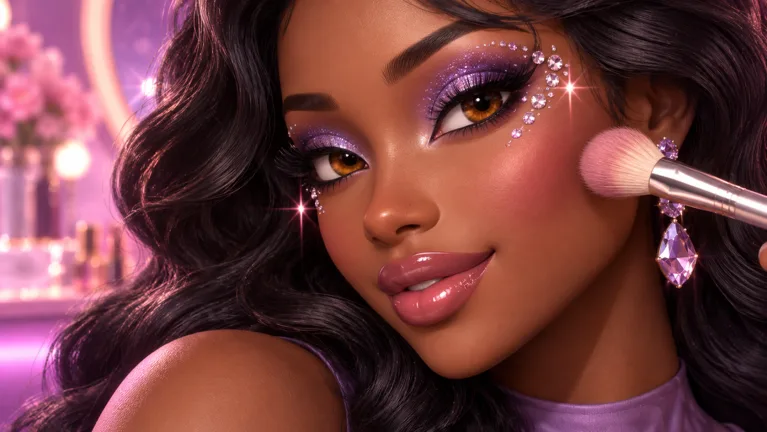
A dramatic eyeliner wing means little if the rest of your face is unfinished—this Makeup Frenzy guide helps you put the whole look together. Makeup Frenzy combines makeup painting, character styling, and themed competitions where players vote for their favorite creations. Use this Makeup Frenzy guide to organize your tools, follow the theme, and leave room for finishing touches before the round ends.
You can play Makeup Frenzy on Roblox. The experience is developed by ciao kombucha fanclub and supports up to 14 players per server.
The basic competition loop is straightforward:
| Stage | What happens |
|---|---|
| Theme | A round gives you a theme to interpret through your look. |
| Makeup | You apply and blend makeup, adjusting colors and tools. |
| Styling | You customize features such as eyes, lashes, and hair. |
| Voting | Players rate the looks presented during the round. |
| Results | The competition produces placements, and players earn rewards. |
Start by turning the theme into a clear visual plan. For a black, white, and gray round, that means choosing a grayscale palette before you start painting. Keep that palette in mind when selecting eyeshadow, lipstick, eye color, and decorative details.
Build a complete face before chasing elaborate effects. Put down the base, establish the eyes and lips, then add hair and smaller accents. An unfinished lip combination or missing hairstyle can leave your design feeling incomplete even when the eyeliner is detailed.
Makeup Frenzy had 6,598,602 visits and 26,785 favorites as of October 13, 2026. Those numbers describe its popularity; your immediate challenge is much smaller: finish a coherent look within the round.
Learn the Makeup Tools Before Adding Detail
The practical starting point for this Makeup Frenzy guide is learning how brush size, strength, and blending work together. The game lets you adjust brush size and strength, zoom toward facial features, and use a beauty blender to soften your makeup.
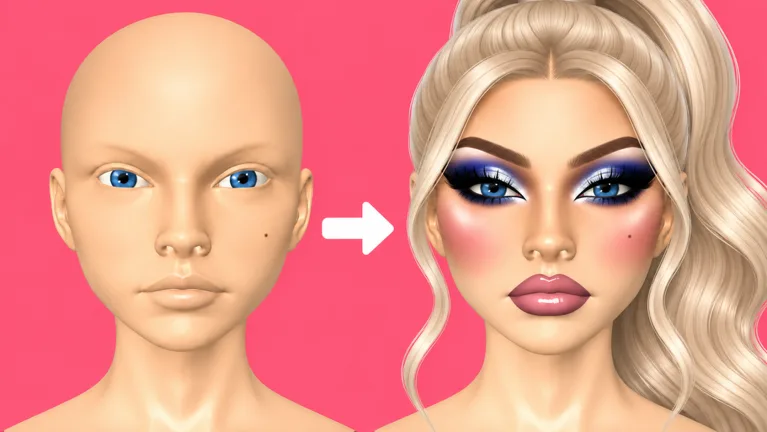 Image: Roblox / ciao kombucha fanclub
Use a larger brush for broader areas, then shrink it for narrow details. Zoom in for eyeliner, nose contour, and lip edges. Zoom back out afterward to judge how those details fit the entire face.
| Tool or option | What you can do with it |
|---|---|
| Contour | Add darker shading around areas such as the cheeks and nose. |
| Concealer | Apply lighter color beneath the eyes and on the forehead or chin. |
| Beauty blender | Blend contour, concealer, eyeshadow, and lip colors. |
| Eyeshadow and eyeliner | Build eye makeup with shading and drawn lines. |
| Brow stamp | Apply a brow shape and adjust its size. |
| Lip color, liner, and gloss | Combine a lip color with an outline and glossy finish. |
| Hair styling | Select hair and adjust its position. |
Control the brush before drawing
As you follow this Makeup Frenzy guide, reduce the brush size before attempting a thin wing or lip outline. Make a short stroke, check its placement, and continue once you like the result.
Keep the first application restrained when working with a strong contrast. Black contour on a white base creates a dramatic effect, so begin with small areas and blend before extending the shading.
Treat strength as a setting to adjust for the task. Change it while blending broad shading, then lower it when softening a narrow lip outline. Check the result after each adjustment instead of assuming one setting suits every tool.
Blend without losing the design
Blend along the boundary between colors. For smoky eyes, soften the transition between dark shadow and the lighter inner corner. For lips, work around the liner with a smaller blender so the outline still frames the mouth.
Stop periodically and inspect the whole face. The target is a controlled transition, with enough contrast left to show the shape you intended.
Use presets to keep moving
Brow stamps give you a preset shape that you can resize. Select a shape that suits the expression you want, adjust its size, and move on once it fits.
Check tool labels before drawing. Eyeliner and eyebrow pencil serve different parts of the face, and choosing the wrong one adds unnecessary correction work. If a lip application produces the wrong color, use undo and select another shade.
Step-by-Step Grayscale Makeup Tutorial
A black, white, and gray theme is a useful exercise because it makes contrast central to the look. You can create a dramatic face through placement, blending, and texture while keeping the palette limited.
Follow this Makeup Frenzy guide’s grayscale example, then adjust the intensity to suit your own design.
| Feature | Color combination used in the grayscale look |
|---|---|
| Base and concealer | White |
| Cheek and nose contour | Black, blended into the base |
| Eyeshadow | Black with gray inner corners |
| Eyeliner and brows | Black |
| Lips | Gray color, black liner, and white gloss |
| Eye color and accents | Gray eyes with white glitter or a white star detail |
1. Establish the base
Apply white across the face for this particular design. Rotate the head to check the back and look beneath the chin so those areas fit the rest of the base.
Keep the coverage consistent before starting contour. Checking the head from different angles also helps you spot areas that are easy to miss while focusing on the front.
2. Shape the cheeks and nose
Apply black contour around the cheeks and blend it into the white base. Keep the darker areas controlled so they provide shape without taking over the face.
Zoom toward the nose, reduce the brush size, and add the narrower contour there. Blend it before zooming out to assess the balance between the cheeks and center of the face.
3. Add lighter definition
Use white concealer beneath the eyes, on the forehead, and on the chin. Blend each area into the surrounding makeup.
Inspect the transitions between concealer and contour. Preserve the darker shading where you want definition, while softening abrupt edges around the brighter areas.
4. Build the smoky eyes
Apply black eyeshadow, then place gray toward the inner corners. Blend the boundary to create a transition between the shades.
Use a smaller brush for eyeliner. Draw the wing, connect it to the rest of the line, and zoom out before adding more. Check both eyes together rather than spending all your attention on one side.
Add black brow stamps and resize them to fit. Choose lashes that leave your eye design visible.
5. Finish the lips and styling
Apply gray to the upper and lower lips, then outline them in black. Use a small blender at reduced strength to soften the edge, and add white gloss for the finishing effect.
Set the eye color to gray. Choose a hairstyle and adjust its position so it sits where you want it.
For an extra accent, add white glitter near the inner eye corners. A white star detail also fits this palette when you have the relevant shape tools available. Keep those touches for the end, after the main makeup and hair are finished.
Finish the Round and Vote Thoughtfully
The most useful habit in this Makeup Frenzy guide is completing the major features before refining any single one. Timed rounds make it easy to spend too long on eyeliner and discover that the lips or hair still need attention.
Work through the face in a repeatable order:
- Choose the palette. Decide which colors express the theme.
- Complete the base. Apply contour and concealer, then blend.
- Establish the eyes. Add shadow, liner, brows, and lashes.
- Finish the lips. Apply color, outline, and blend.
- Add hair. Select the style and check its position.
- Decorate last. Use glitter or shapes once the main look is complete.
If a wing is taking too long, simplify it and continue. Finish the lip color before returning to tiny corrections. Save optional accents for whatever time remains.
Check hair from the front and side after repositioning it. Hair can clip through the head during presentation, so inspect its placement before the round ends. Keep the face visible when choosing a style; the eye makeup needs room to show.
During voting, look at theme fit, blending, and how the features work together. In a grayscale round, consider whether the colors follow that restriction. Then examine the transitions around the eyes, cheeks, and lips.
Use the same standards when assessing your own result:
- Does the palette communicate the theme?
- Are the eyes, lips, and hair finished?
- Do dark and light areas blend cleanly?
- Are decorative details supporting the design?
- Is the hairstyle positioned the way you intended?
Placements depend on player voting. Use each round to identify one feature to improve next time, such as cleaner lip edges or faster eyeliner.
Game Passes and Extra Styling Options
Makeup Frenzy offers passes for additional tools and styling features. The prices below apply to the game’s October 13, 2026 offerings.
| Game pass | Price | Included features |
|---|---|---|
| VIP | 349 Robux | VIP makeup tools, voting backgrounds, and 3 daily theme choices |
| Second Hair Slot | 79 Robux | Permanent access to a second hair slot |
| Shape Stencils | 119 Robux | Permanent access to shape stencils |
| My Lookbook - Unlimited Slots | 139 Robux | Unlimited saved-look slots |
Match a purchase to a feature you actually want to use. If combining hairstyles is part of your design plan, look at the Second Hair Slot. If geometric details are your focus, review Shape Stencils. For a larger collection of saved designs, consider My Lookbook - Unlimited Slots.
Read VIP’s included features carefully: its package covers makeup tools, voting backgrounds, and daily theme choices. Keep that purchase decision separate from your expectations about competition placements, which come from player voting.
Use this Makeup Frenzy guide to practice brush control and finishing order before deciding which extras fit your style. Repeat a manageable design, learn where you spend the most time, and choose additional features around the looks you enjoy making.
FAQ
How do I start using this Makeup Frenzy guide?
Join Makeup Frenzy on Roblox, read the round’s theme, and choose a matching palette. Complete the base, eyes, lips, and hair before adding decorative details. Practice adjusting brush size and blending during that process.
How do I blend makeup in Makeup Frenzy?
Select the beauty blender and work over the edges between colors. Adjust its size and strength for the area. Use a smaller blender for lip outlines and other narrow details, then zoom out to inspect the full face.
Does Makeup Frenzy have themed competitions?
Yes. Players create makeup looks for themed rounds, style their characters, and vote on the presented looks. The game awards rewards, and competition results include placements. Servers support up to 14 players.
What does VIP include in Makeup Frenzy?
As of October 13, 2026, VIP costs 349 Robux and includes VIP makeup tools, voting backgrounds, and 3 daily theme choices. Second Hair Slot, Shape Stencils, and My Lookbook - Unlimited Slots are separate passes.
Continue with
 Makeup Frenzy How to Play: Beginner Tips for Each RoundLearn Makeup Frenzy how to play, from brush controls and blending to themed rounds, styling, and voting. Build a complete look before the timer runs out.
More in Guide
Makeup Frenzy Perfect Look Guide: Polish Every Round
Use this Makeup Frenzy perfect look guide to match themes, blend contour, refine eyeliner, and finish your Roblox makeup before the round ends. Start here.
Makeup Frenzy vs Makeup Mania: Which Roblox Game Wins?
Makeup Frenzy vs Makeup Mania: Compare makeup tools, themed rounds, presets, and Robux passes, then learn how to finish a look before the timer runs out.
Join the community
Official channels for news, updates and player help: